ch1 - A Tutorial Introduction
💡 Used functions in this chapter: printf, getchar, putchar.
🔵 ...This is the big hurdle; to leap over it you have to be able to create the program text somewhere, compile it, load it, run it, and find out where your output went. With these mechanical details mastered, everything else is comparatively easy. (p.5-6)
🔵 A C program, whatever its size, consists of functions and variables.
🔵 The statements of a function are enclosed in braces {}.
🔵 An escape sequence like \n provides a general and extensible mechanism for representing hard-to-type or invisible characters.
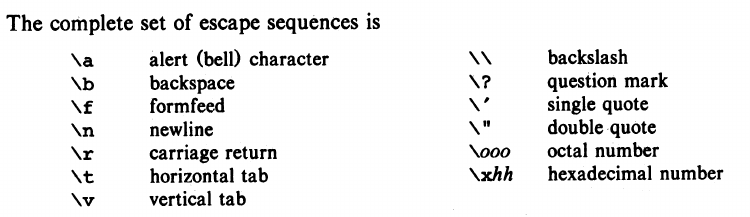
🔴 هر escape sequence نمایانگر فقط یک کاراکتر است.
🔔
\u برای نمایش کاراکترهای یونیکد به کار میرود.
🔵 Comments may appear anywhere a blank or tab or newline can.
🔵
The range of both int and float depends on the machine you are using;
16-bit ints, which lies between -32768 and +32767, are common, as are 32 ints.
min = -2n-1
max = +2n-1-1
🔵 A float number is typically a 32-bit quantity, with at least six significant digits and magnitude generally between about 10-38 and 10+38.
🔵 basic data types:
- char
- short (short integer)
- int
- long (long integer)
- float
- double (double-precision floating point)
The sizes of these objects are also machine-dependent.
🔵 There are also arrays, structures and unions of these basic types, pointers to them, and functions that return them.
🔵 Individual statements are terminated by semicolons.
🔵 In C, as in many other languages, integer division truncates: any fractional part is discarded.
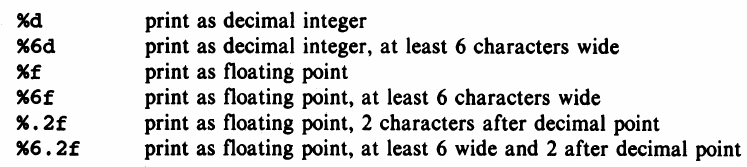
🔵 printf is a general-purpose output formatting function. Its first argument is a string of characters to be printed, with each % indicationg where one of the other (second, third, ...) arguments is to be substituted, and in what form it is to be printed.
🔴 تعداد % ها در آرگومان اول باید با تعداد آرگومانهای داده شده به printf بعد از اولین آرگومان برابر باشد. نوع آنها هم باید match باشد، در غیر این صورت جواب نادرستی خواهید گرفت.
🔵 printf is not part of the C langugae; there is no input or output defined in C itself.
🔵 A decimal point in a constant indicates that it is floating point. (i.e. 5.0)
🔵 if an arithmetic operator has integer operands, an integer operation is performed. If an arithmetic operator has one floating-point operand and one integer operand , however, the integer will be converted to floating point before the operation is done.
🔵
Notice that the assignment fahr = lower and the test while (fahr <= upper)
also work in the natural way, the int is converetd to float before the
operation is done. (page. 12)
🔵
%3.0f is a conversion specification. f is a conversion type character.
🔵 In any context where it is permissible to use the value of a variable of some type, you can use a more complicated expression of that type.
🔵 In for statement, the initialization, condition, and step can be any expression.
🔵
A macro name (symbolic constant or symbolic name) #define name replacement text
has the same form as a
variable name: a sequence of letters and digits that begins with a letter.
The replcement text can be any sequence of characters; it is not limited to
numbers. There is no semicolon at the end of a #define line.
🔵 The model of input and output supported by the standard library is very simple. Text input or output, regardless of where it originates or where it goes to, is dealt with as streams of characters. A text stream is a sequence of characters divided into lines; each line consists of zero or more characters followed by a new line character. It is the responsibility of the library to make each input or output stream conform to this model; the C programmer using the library need not worry about how lines are represented outside the program.
📝 Given getchar() and putchar(), you can write a surprising amount of useful code without knowing anything more about input and output.
🔵 The type char is specifically meant for storing character data, but any integer type can be used too.
🔵 ... we cannot use char since variable c must be big enough to hold EOF in addition to any possible char. Therefore we use int.
🔵
In C, any assignment, such as c = getchar() is an expression and has a value,
which is the value of the left hand side after the assignment. This means that
an assignment can appear as part of a larger expression.
🔵 The operators ++ and -- can be either prefix operators (++nc) or postfix (nc++); these two forms have different values in expressions, as will be shown in Chapter 2, but ++nc and nc++ both increment nc.
🔵 printf uses %f for both float and double, %.0f suppresses printing of the decimal point and the fraction part, which is zero.
🔵 The grammatical rules of C require that a for statement have a body. The isolated semicolon, called a null statement, is there to satisfy that requirement. We put it on a seperate line to make it visible. here
🔵 ..., hence, counting lines is just counting newlines.
🔵 A character written between single quotes represents an integer value equal to the numerical value of the character in the machine's character set. This is called a character constant, although it is just another way to write a small integer. So, for example, 'A' is a character constant; in the ASCII character set its value is 65, the internal representation of the character A.
🔵 The escape sequences used in string constants are also legal in character constants, so '\n' stands for the value of the newline character, which is 10 in ASCII.
🔵 You should note carefully that '\n' is a single character, and in expressions is just an integer.
🔵 The escape sequence \t is a visible representation of the tab character.
🔵 The precedence of && is just higher than ||.
🔵 Expressions conected by && or || are evaluated left to right, and it is guaranteed that evaluation will stop as soon as the truth or falsehood is known.
🔵 Array subscripts always start at zero in C. A subscript can be any integer expression, which includes integer variables like i, and integer constants.
🔴 در تمام مجموعههای کاراکتری از قبیل ASCII و غیره کدهای کاراکترهای '0' تا '9' به صورت پشت سر هم و افزایشی تعریف شدهاند.
🔵 By definition, chars are just small integers, so char variables and constants are identical to ints in arithmetic expressions.
🔵 There can be any number of
else if (condition)
    statement
groups between the initial if and the final else.
🔵 if-else statement and switch statement provide ways to write a multi-way branch.
🔵 With properly designed functions, it is possible to ignore how a job is done; knowing what is done is sufficient.
🔵
C has no exponentiation operator like the ** of Fortran.
🔵 The first line of a function itself, declares the parameter types and names, and the type of the result that the function returns. This parameter names are local to that function, and are not visible to any other function: other routines can use the same names without conflict.
🔵 ... return statement ...
🔵 A function need not return a value; a return statement with no expression causes control, but no useful value, to be returned to the caller, as does "falling off the end" of a function by reaching the terminating right brace.
🔵 Since main is a function like any other, it may return a value to its caller, which is in effect the environment in which the program was executed. Typically, a return value of zero implies normal termination; non-zero values signal unusual or erroneous termination conditions.
🔵 Parameter names are optional in a function prototype. Well-chosen names are good documentation, however, so we will often use them.
🔵 In C, all function arguments are passed "by value." This means that the called function is given the values of its arguments in temporary variables rather than the originals. Call by value is an asset, however, not a liability.
🔵 In C, the called function cannot directly alter a variable in the calling function; it can only alter its private, temporary copy.
💡 When necessary, it is possible to arrange for a function to modify a variable in a calling routine. The caller must provide the address of the variable to be set (technically a pointer to the variable), and the called function must declare the parameter to be pointer and access the variable indirectly through it. We will cover pointers in Chapter 5.
🔵 The story is different for arrays. When the name of an array is used as an argument, the value passed to the function is the location or address of the beginning of the array — there is no copying of array elements. By subscripting this value, the function can access and alter any element of the array.
🔵 Zero is an acceptable end-of-file return because it is never a valid line length. Every text line has at least one character; even a line containing only a newline has length 1.
🔵 Some functions return a useful value; others; like copy, are used only for their effect and return no value. In this case return type is void, which states explicitly that no value is returned.
🔵
... '\0', the null character, whose value is zero, must be put at the end of
a character array to denotes the end of string.

🔵 '\0' is not a part of normal text.
🔵 ..., the variables in main, such as line, longest, etc., are private or local to main. Beacuse they are declared within main, no other function can have direct access to them. The same is true of the variables in other functions; for example, the variable i in getline is unrelated to the i in copy.
🔵 local variable = automatic variable
🔵 In Chapter 4 we discuss the static storage class, in which local variables do retain their values between calls.
🔵 Because automatic variables come and go with function invocation, they don't retain their values from one call to the next, and must be explicitly set upon each entry. If they are not set, they will contain garbage.
🔵 As an alternative to automatic variables, it is possible to define variables that are external to all functions, that is, variables that can be accessed by name by any function. Beacause external variables remain in existence permanently, they retain their values even after the functions that set them have returned.
🔵 An external variable must be defined, exactly once, outside of any function; this sets aside storage for it. The variable must also be declared in each function that wants to access it; this states the type of the variable. This declaration may be an explicit extern statement or may be implicit from context.
🔵 The external variables in main, getline, and copy are defined by the first lines of the program, which states their type and cause storage to be allocated for them.
🔵 Before a function can use an external variable, the name of the variable must be made known to the function. One way to do this is to write an extern declaration in the function; the declaration is the same as before except for the added keyword extern.
🔵 In certain circumstances, the extern declaration can be omitted. If the definition of an external variable occurs in the source file before its use in a particular function, then there is no need for an extern declaration in the function. In fact, the common practice is to place definitions of all external variables at the beginning of the source file, and then omit all extern declarations.
🔔 If the program is in several source files, and a variable is defined in file1 and used in file2 and file3, then extern declarations are needed in file2 and file3 to connect the occurrences of the variable. The usual practice is to collect extern declarations of variables and functions in a seperate file, historically called a header, that is included by #include at the front of each source file. This topic is discussed at length in Chapter 4. file1.c file2.c file3.c file.h
🔵 For compatability with older C programs the standard takes an empty list as an old-style declaration, and turns off all argument list checking; the word void must be used for an explicitly empty list.
🔵 About global variables, "definition" refers to the place where the variable is created or assigned storage; "declaration" refers to places where the nature of the variable is stated but no storage is allocated.
K&R examples in book
- Hello, world
- Fahrenheit to Celsius
- Copy input to output
- Count characters in input
- count lines in input
- count lines, words, and characters in input
- count digits, white space, others
- Raise base to n-th power
- Print longest input line
Exercises
Exercise 1-1. Run the "hello, world" program on your system. Experiment with leaving out parts of the program, to see what error messages you get. □
Exercise 1-2. Experiment to find out what happens when printf's argument string contains \c, where c is some character not listed above. □
Exercise 1-3. Modify the temperature converion program to print a heading above the table. □
Exercise 1-4. Write a program to print the corresponding Celsius to Fahrenheit table. □
Exercise 1-5. Modify the temperature conversion program (for version) to print the table in reverse order, that is, from 300 degrees to 0. □
Exercise 1-6. Verify that the expression getchar() != EOF is 0 or 1. □
Exercise 1-7. Write a program to print the value of EOF. □
Exercise 1-8. Write a program to count blanks, tabs, and new lines. □
Exercise 1-9. Write a program to copy its input to its output, replacing each string of one or more blanks by a single blank. □
Exercise 1-10. Write a program to copy its input to its output, replacing each tab by \t, each backsapce by \b, and each backslash by \\. This makes tabs and backspace visible in an unambiguous way. □
Exercise 1-11. How would you test the word count program? What kinds of input are most likely to uncover bugs if there are any? □
Exercise 1-12. Write a program that prints its input one word per line. □
Exercise 1-13. Write a program to print a histogram of the lengths of words in its input. It is easy to draw the histogram with the bars horizontal; a vertical orientation is more challenging. □
Exercise 1-14. Write a program to print a histogram of the frequencies of different characters in its input. □
Exercise 1-15. Rewrite the temperature conversion program of Section 1.2 to use a function for conversion. □
Exercise 1-16. Revise the main routine of the longest-line program so it will correctly print the length of arbitrarily long input lines, and as much as possible of the text. □
Exercise 1-17. Write a program to print all input lines that are longer than 80 characters. □
Exercise 1-18. Write a program to remove trailing blanks and tabs from each line of input, and to delete entirely blank lines. □
Exercise 1-19. Write a function reverse(s) that reverses the character string s. Use it to write a program that reverses its input a line at a time. □
Exercise 1-21. Write a program entab that replaces strings of blanks by the minimum number of tabs and blanks to achieve the same spacing. Use the same tab stops as for detab. When either a tab of a single blank would suffice to reach a tab stop, which would be give preference? □
Exercise 1-22. Write a program to "fold" long inut lines into two or more shorter lines after the last non-blank character that occurs before the n-th column of input. Make sure your program does something intelligent with very long lines, and if there are no blanks or tabs before the specified column. □
Exercise 1-23. Write a program to remove all comments from a C program. Don't forget to handle quoted strings and character constants properly. C comments do not nest. □
Exercise 1-24. Write a program to check a C program for rudimentary syntax errors like unbalanced parentheses, brackets and braces. Don't forget about quotes, both single and double, escape sequences, and comments. (This program is hard if you do it in full generality.) □